> For the complete documentation index, see [llms.txt](https://docs.kyberswap.com/llms.txt). Markdown versions of documentation pages are available by appending `.md` to page URLs; this page is available as [Markdown](https://docs.kyberswap.com/user-guide/limit-order/faq.md).
# FAQ
Your KyberSwap Limit Order Questions Answered
## General
Which chains are supported by Limit Orders?
The full list of supported chains can be found on [Supported Exchanges and Networks](/getting-started/supported-exchanges-and-networks.md).
Which tokens does Limit Orders support?
KyberSwap whitelists well-known tokens for ease of access, but you can import custom tokens that meet the ERC20 standard via our user interface. For more information on how to do this, please refer to [Add Your Favourite Tokens](/user-guide/user-guides/add-your-favourite-tokens.md).
## Trading
How do I tell If my Limit Order has been filled?
Under your Active Orders, you should be able to see a yellow progress bar if your order has been partially filled. You can click on the dropdown button next to the order to see the individual taker orders that partially filled your limit order.
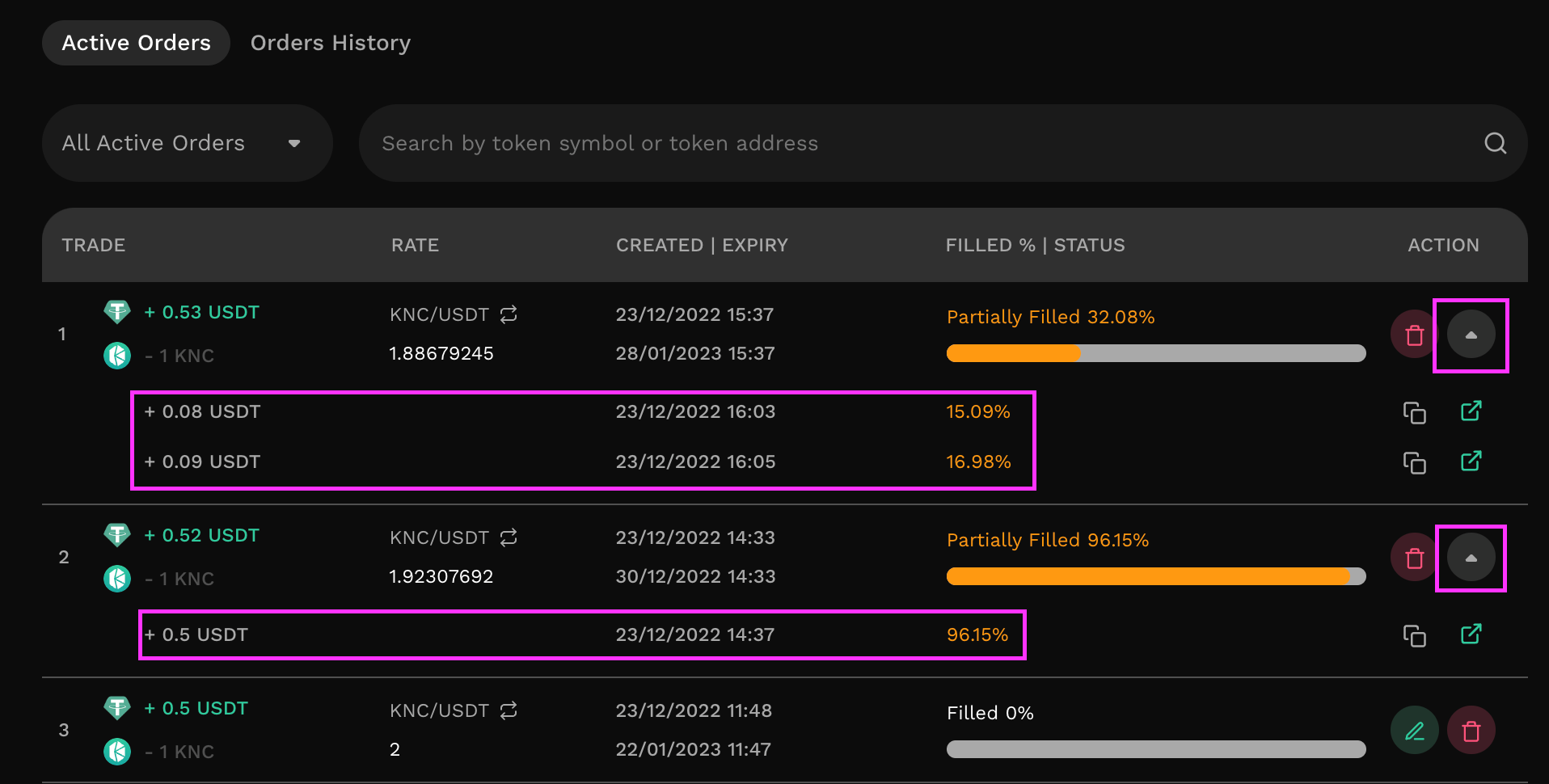 If you cannot find your order on the Active Orders tab, it may have been completely filled. Filled limit orders appear under your Order History and have a full green progress bar. You can click on the dropdown button next to the order to see the individual taker orders that contributed to filling your limit order.
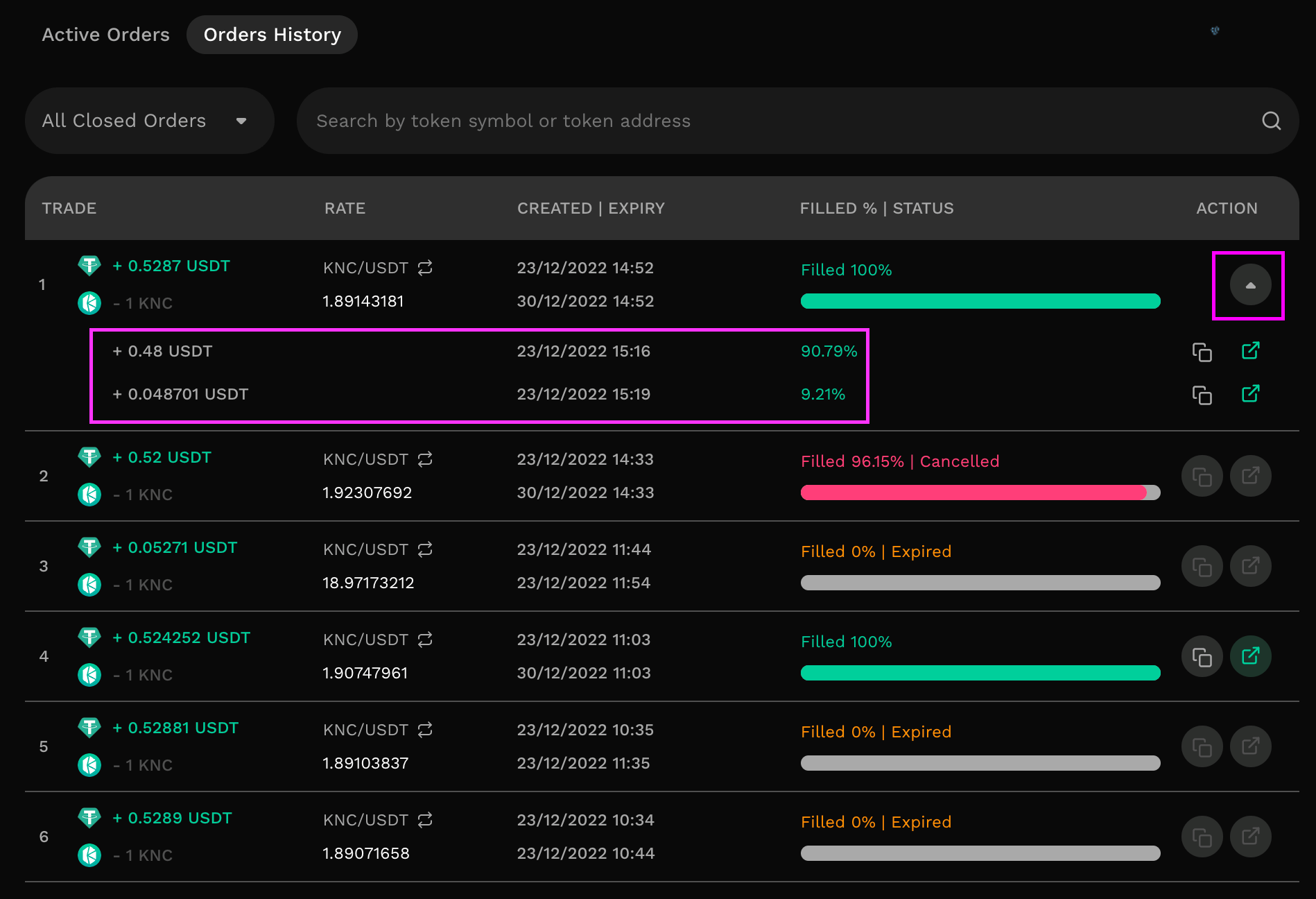
Why is my Limit Order not being filled?
Here are a few common reasons for Limit Orders not being filled.
**The exact limit order price target might not have been reached.**
There might be a difference in the the price of your limit order and the current market price. The chance of your order being filled increases as the market price gets closer to your order’s price.
**The order might not have been profitable for a taker.**
Takers must consider the order's size, gas fees, and personal profit margin before deciding to fill your order. Furthermore, some takers might only fill part of your limit order, and then seek out more profitable orders elsewhere.
**The order involves tokens that have low trading volumes.**
Orders that involve exotic tokens or token pairs may have fewer takers to fill the order.
Why can't I view my order?
There are several factors that can make you not see your order:
* The transactions might not have been signed before placing
* The order was already executed (you can check in Order History tab)
* The page needs to be refreshed.
Why does modifying or canceling my limit order incur gas fees?
You can now cancel for free with [gasless cancel](/kyberswap-solutions/limit-order/concepts/gasless-cancellation.md). Please refer to [Cancellation Options ](/user-guide/limit-order/cancel-limit-orders.md#cancellation-options)for the user guide.
For users who require cancellation to be instant, KyberSwap provides a [hard cancel](/kyberswap-solutions/limit-order/concepts/gasless-cancellation.md#hard-cancel) option. Gas is required in this case as the signed maker transaction (i.e. newly created order) is distributed to our network of off-chain takers. As all potential takers now have a copy of the maker transaction, the only way to guarantee cancellation is to send a cancellation transaction to the chain so that if any other takers match and execute the maker transaction on-chain, the limit order will fail.
Please refer to [Off-Chain Relay, On-Chain Settlement](/kyberswap-solutions/limit-order/concepts/off-chain-relay.md) for further details on the Limit Order mechanism.
Still can't find what you're looking for? Reach out to us on [Discord](https://discord.gg/kyberswap).
---
# Agent Instructions
This documentation is published with GitBook. GitBook is the documentation platform designed so that both humans and AI agents can read, navigate, and reason over technical content effectively. Learn more at gitbook.com.
## Querying This Documentation
If you need additional information that is not directly available in this page, you can query the documentation dynamically by asking a question.
Perform an HTTP GET request on the current page URL with the `ask` query parameter, and the optional `goal` query parameter:
```
GET https://docs.kyberswap.com/user-guide/limit-order/faq.md?ask=&goal=
```
`ask` is the immediate question: it should be specific, self-contained, and written in natural language.
`goal` is optional and describes the broader end goal you are ultimately trying to accomplish on behalf of the user. GitBook uses it to tailor the answer towards what is most useful for that goal.
The response will contain a direct answer to the question and relevant excerpts and sources from the documentation.
Use this mechanism when the answer is not explicitly present in the current page, you need clarification or additional context, or you want to retrieve related documentation sections.