> For the complete documentation index, see [llms.txt](https://docs.kyberswap.com/llms.txt). Markdown versions of documentation pages are available by appending `.md` to page URLs; this page is available as [Markdown](https://docs.kyberswap.com/~/changes/1kQEhDNzHMDf7SwOE6Yu/liquidity-solutions/kyberswap-classic/user-guides/yield-farming-on-classic.md).
# Yield Farming On Classic
Claim Additional Classic Rewards
## Introduction
Yield Farming or Liquidity Mining is a aspect of DeFi that allows Liquidity Providers (LPs) to passively earn a return on capital contributed to a liquidity pool. The Yield Farm provides LPs with rewards over time to incentivize LPs to continue to provide liquidity to the pool as well as to help offset their risk.
This guide covers yield farming on KyberSwap Classic. It covers the following aspects of yield farming on KyberSwap Classic:
* [Staking LP Tokens](#staking-lp-tokens)
* [Harvesting and Claiming Rewards](#harvesting-and-claiming-rewards)
* [Unstaking LP Tokens](#unstaking-lp-tokens)
Liquidity Provider Flow
Still deciding on which solution suits you best?
* **Overview**: [Earn Yield By Contributing Liquidity](/~/changes/1kQEhDNzHMDf7SwOE6Yu/kyberswap-solutions/kyberswap-interface/user-guides/earn-yield-by-contributing-liquidity.md)
* **Detailed comparison**: [Classic vs Elastic](/~/changes/1kQEhDNzHMDf7SwOE6Yu/liquidity-solutions/classic-vs-elastic.md)
#### Next steps
1. [Connect Your Wallet](/~/changes/1kQEhDNzHMDf7SwOE6Yu/kyberswap-solutions/kyberswap-interface/user-guides/connect-your-wallet.md)
2. [Switching Networks](/~/changes/1kQEhDNzHMDf7SwOE6Yu/kyberswap-solutions/kyberswap-interface/user-guides/selecting-preferred-network.md)
3. [Classic Pool Creation ](/~/changes/1kQEhDNzHMDf7SwOE6Yu/liquidity-solutions/kyberswap-classic/user-guides/classic-pool-creation.md)
4. [Add Liquidity To An Existing Classic Pool ](/~/changes/1kQEhDNzHMDf7SwOE6Yu/liquidity-solutions/kyberswap-classic/user-guides/add-liquidity-to-an-existing-classic-pool.md)
5. **Yield Farming On Classic** **<-**
6. [Removing Liquidity On Classic](/~/changes/1kQEhDNzHMDf7SwOE6Yu/liquidity-solutions/kyberswap-classic/user-guides/removing-liquidity-on-classic.md)
## Staking LP tokens
### **Step 1**: Create a Classic liquidity position
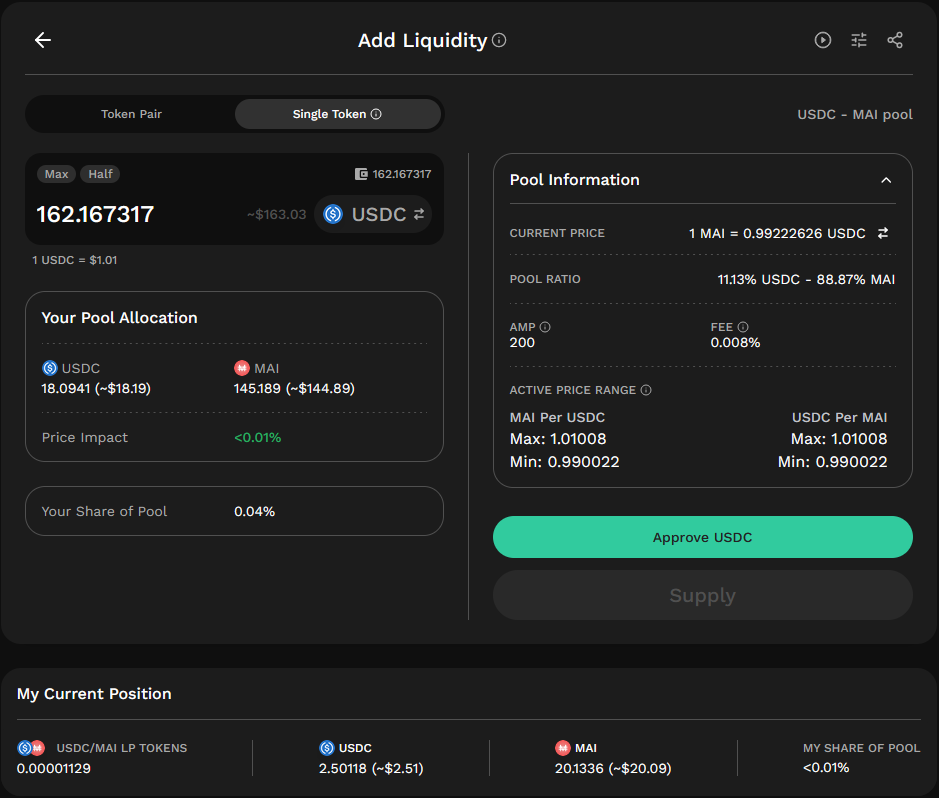
Approve and add liquidity to the farm of your choice. A guide on how to do this can be found [here](/~/changes/1kQEhDNzHMDf7SwOE6Yu/liquidity-solutions/kyberswap-classic/user-guides/add-liquidity-to-an-existing-classic-pool.md). For the purposes of this guide, we will use the following USDC-miMATIC pool on Polygon.
### **Step 2**: Select farming pool
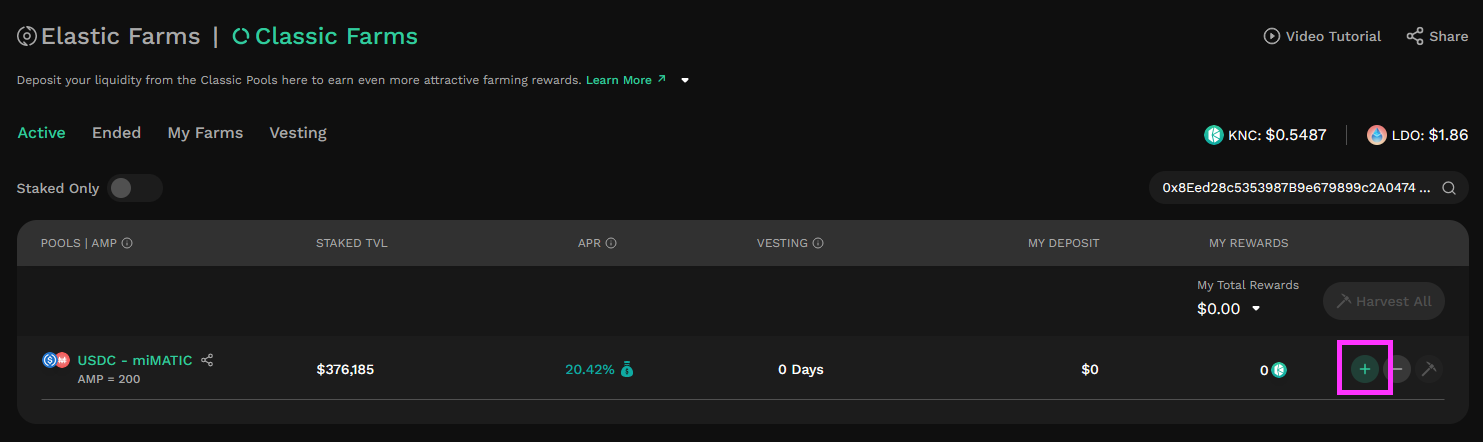
From the Active tab on the Classic Farms page, click on the “+” button associated with your selected farming pool to bring up the Stake window.
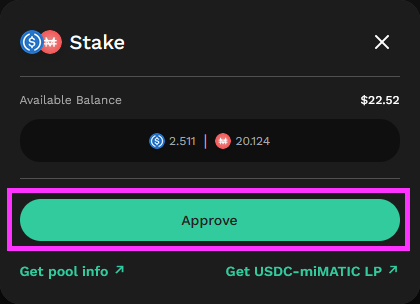
The Stake window should show you the balance you have in the pool.
### Step 3: Approve farming contract
Click on the “Approve” button on the Stake window to give the farming smart contract permission to stake your LP tokens.
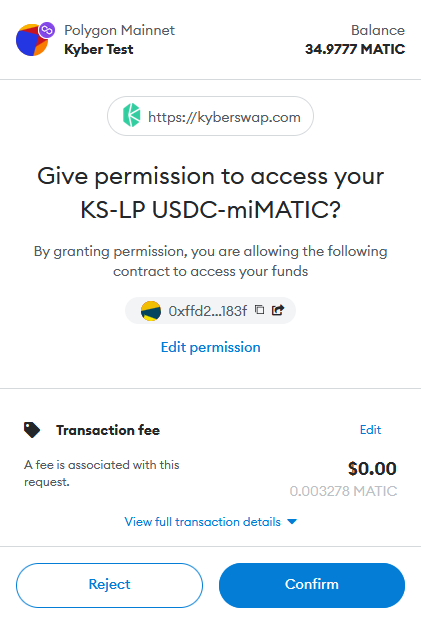
This is an onchain transaction that will require confirmation in your web3 wallet.
### **Step 4**: Specify stake amount
From the Active tab on the Classic Farms page, click on the “+” button once more to bring up the Stake window. Now that you have given the farming smart contract permission to access your LP tokens, the Stake window should look different. You can now specify the amount of LP tokens to stake either by manually typing in an amount or by using the “max” and “half” buttons.
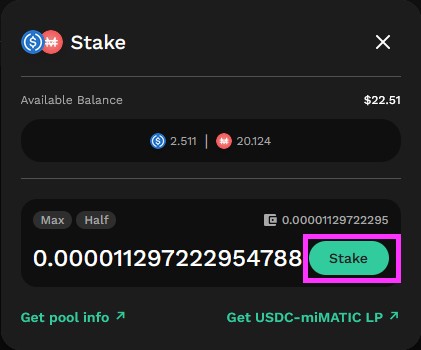
### Step 5: Confirm farming transaction
Click the “Stake” button to proceed. This is an onchain transaction that will require confirmation in your web3 wallet.
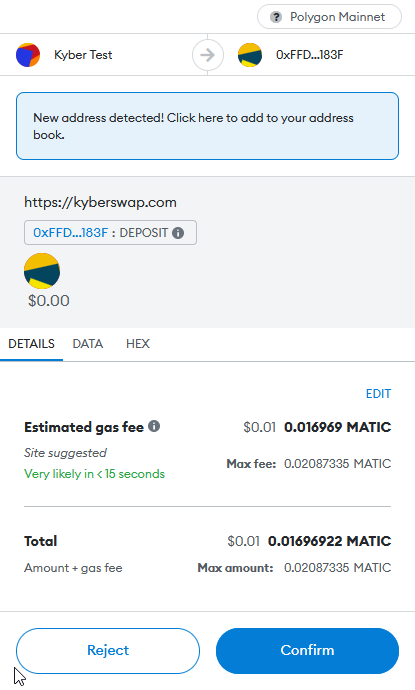
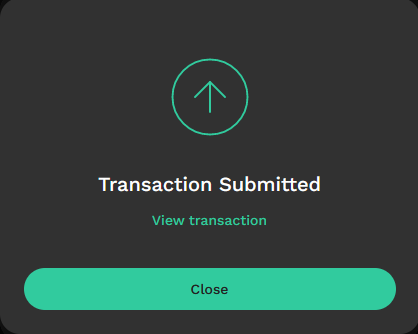
Once you’ve confirmed the transaction you will see a screen informing you that the transaction has been submitted. You can click on “View Transaction” to view your transaction on the appropriate blockchain explorer.
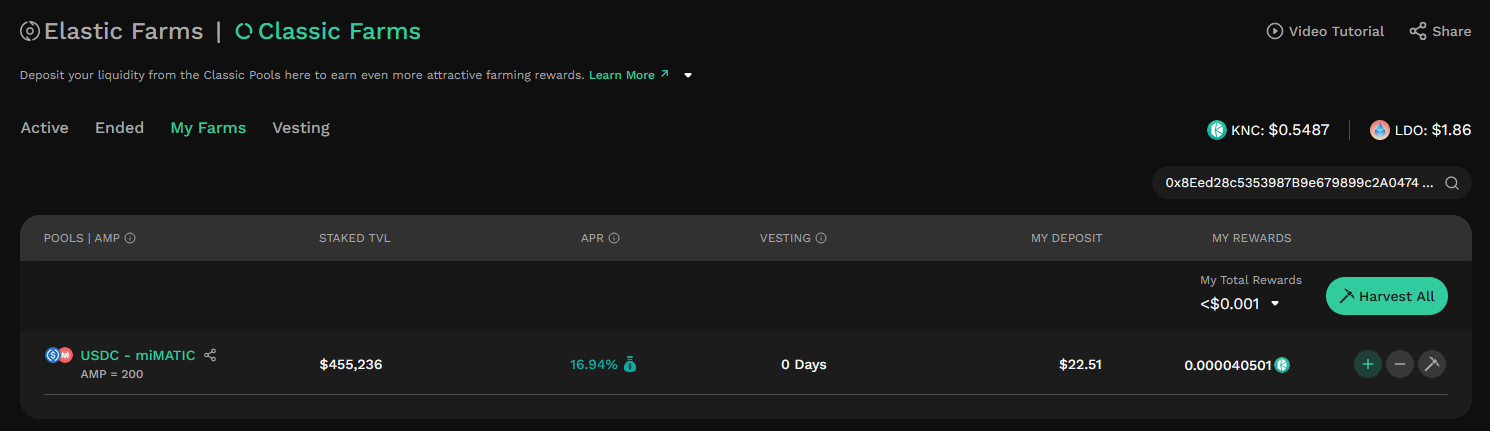
Your LP tokens are now staked and you are eligible to accumulate rewards for as long as your LP tokens remain staked. You should now also be able to see your farming pool under the “My Farms” tab.
## Harvesting and claiming rewards
After you have accumulated rewards, you can harvest them from the pool and subsequently claim them (i.e. withdraw rewards to your wallet).
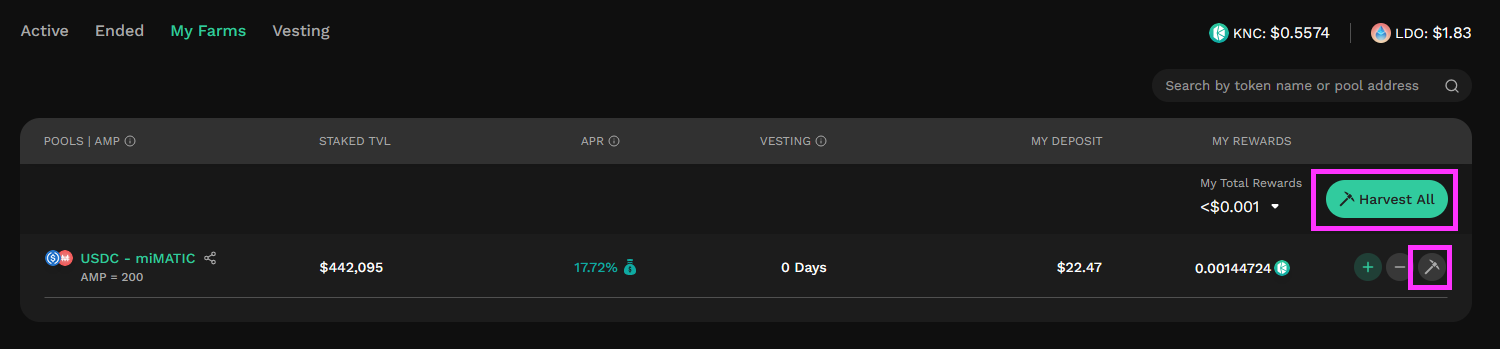
### **Step 1**: Select pools to harvest
From the Farms page, click on the small “pickaxe” button associated with your desired pool to bring up the Harvest screen. Alternatively, if you have multiple pool farms and would like to harvest them all at once, you can use the “Harvest All” button to batch all the harvest transactions together. Please note that this does not save you any gas fees since every individual harvest call of the smart contract still needs to be broadcasted to the blockchain.
### Step 2: Confirm harvest
From the Harvest (or Harvest All) screen that appears, click on the “Harvest” button to proceed. This is an onchain transaction that will require wallet confirmation.
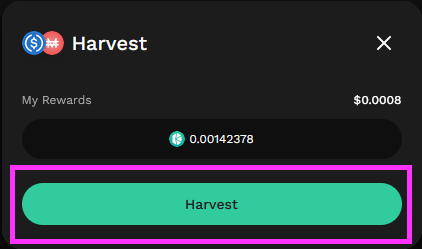
If the pool does not have a rewards vesting schedule, your rewards will automatically be sent to your wallet. Alternatively, if the pool has a vesting schedule, you will need to wait some time after harvesting for the rewards to vest before you can claim them.
### **Step 3**: Claim vested rewards **(vested pools only)**
This step only applies to certain pools with a vesting schedule for rewards. Rewards harvested from such pools will need to be claimed in a separate action following the end of the vesting period. To harvest such rewards, click the “Claim” button in the Vesting tab of the Farms page.
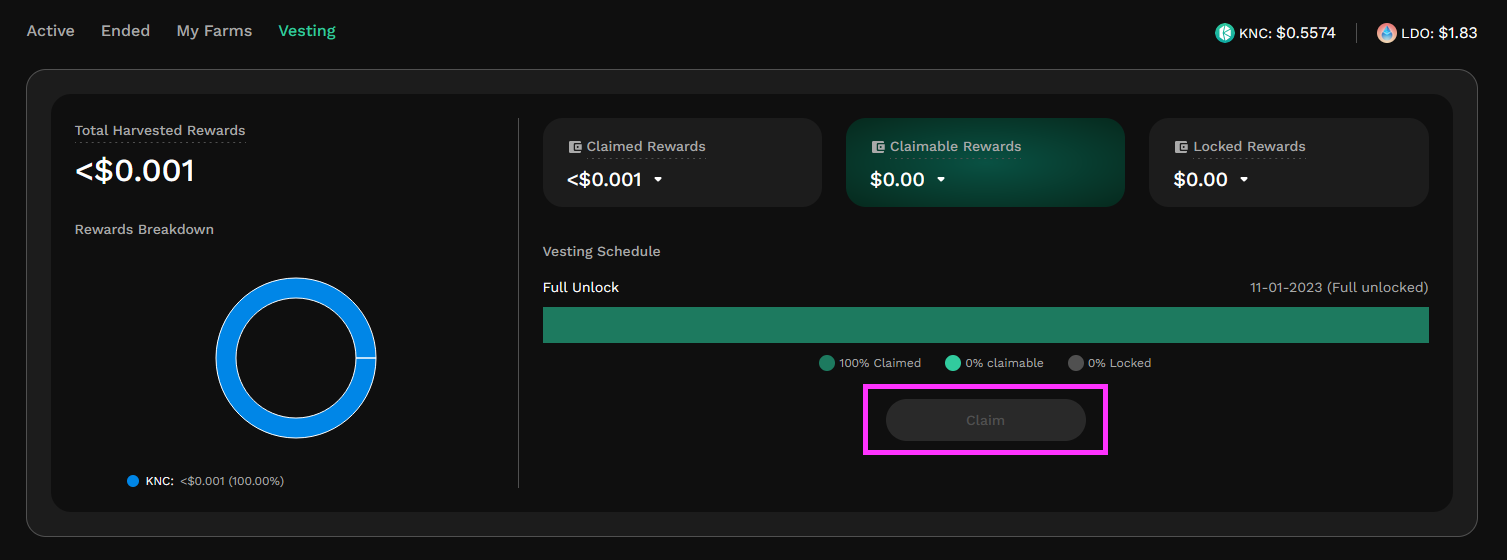
Note: The vast majority of active yield farming pools on KyberSwap do not have a vesting schedule and as such do not require this separate claim step.
## Unstaking LP tokens
You may also choose to unstake your LP Tokens from a farming pool at any time. This will return LP tokens to your wallet and you will cease earning liquidity mining rewards from the pool. On the other hand, this will free up your liquidity in the pool and you will once again be able to withdraw the tokens representing your liquidity position.
### **Step 1**: Select pool to unstake
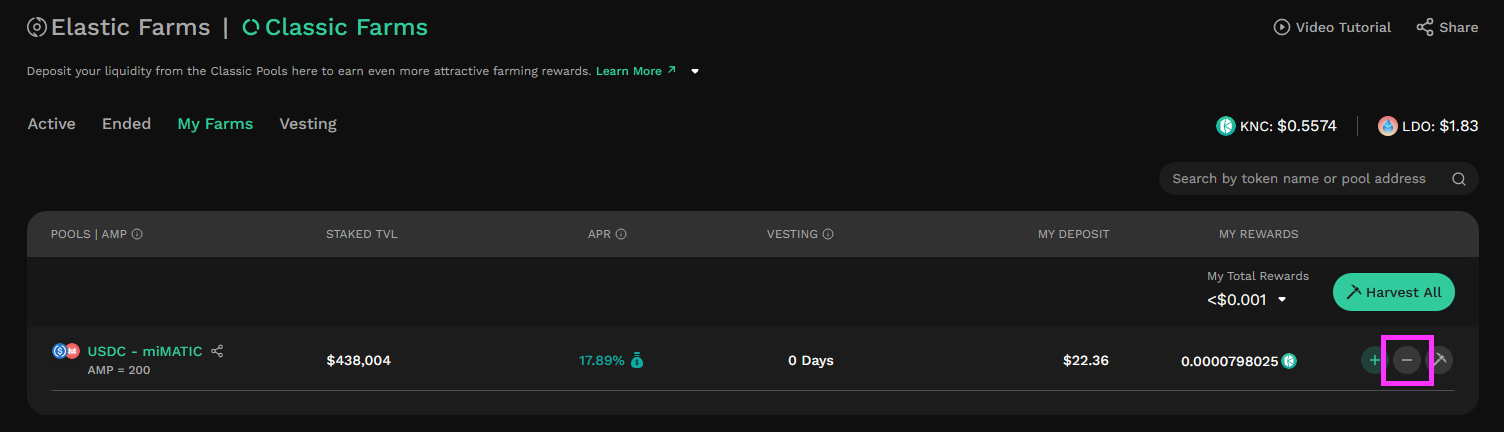
On the Farms page, click on the “-” button of the pool you would like to unstake LP tokens from.
### Step 2: Select unstake amount
On the screen that opens, specify the amount of LP tokens you would like to unstake, and then click the “Unstake” button.
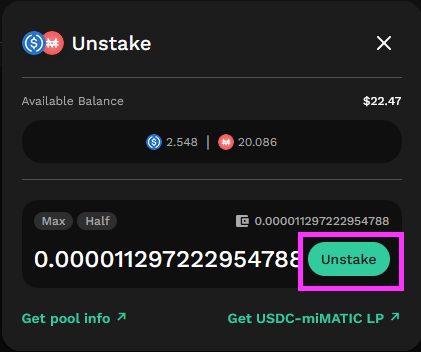
### Step 3: Confirm unstake
This is an onchain transaction. As part of this action, any as-yet unharvested rewards will also automatically be harvested.
---
# Agent Instructions
This documentation is published with GitBook. GitBook is the documentation platform designed so that both humans and AI agents can read, navigate, and reason over technical content effectively. Learn more at gitbook.com.
## Querying This Documentation
If you need additional information that is not directly available in this page, you can query the documentation dynamically by asking a question.
Perform an HTTP GET request on the current page URL with the `ask` query parameter, and the optional `goal` query parameter:
```
GET https://docs.kyberswap.com/~/changes/1kQEhDNzHMDf7SwOE6Yu/liquidity-solutions/kyberswap-classic/user-guides/yield-farming-on-classic.md?ask=&goal=
```
`ask` is the immediate question: it should be specific, self-contained, and written in natural language.
`goal` is optional and describes the broader end goal you are ultimately trying to accomplish on behalf of the user. GitBook uses it to tailor the answer towards what is most useful for that goal.
The response will contain a direct answer to the question and relevant excerpts and sources from the documentation.
Use this mechanism when the answer is not explicitly present in the current page, you need clarification or additional context, or you want to retrieve related documentation sections.